
 |
|
|
|
|
|
 |


 |
Can't get mmp esc to calibrate with traxxas slash 4x4 |
 |

|
 |

|
(#1)
|
|
Guest
Posts: n/a
|
 Can't get mmp esc to calibrate with traxxas slash 4x4 -
05.08.2011, 04:39 AM
Can't get mmp esc to calibrate with traxxas slash 4x4 -
05.08.2011, 04:39 AM
Ok , I have 2 slash 4x4 trucks. One truck has the mmp and novak ballistic 550 5.5 motor and the ther mmp has the vxl 3500 motor. Using a traxxas 2.4 radio.
Whatever I do for one I am also trying on the other which leads me to believe I have a esc post update related issue. A couple weeks back I got into the groove and decided it would be good to update the software version, I mean what could it hurt since it had been all winter so a few versions wouldn't hurt or so I've thought so far. I upgraded both esc's to 1.32. During this upgrade my laptop would freeze after the install when I updated the firmware. This was on Win 7 starter edition. I eventually got it to upgrade and set all the settings for lipo cutoff (3.4) and left alot as it was otherwise. I went to the ball fields with one truck Fri night to drive while the son was doing baseball practice. I had to bind the tx to the rx so I did it. I then got my smart phone out to make me smart and read up on the mmp manual that I had downloaded. Ok now I'm smart because I was on the smart phone so I proceeded to do the calibration per castle manual. Well that's where all the trouble started. The yellow light flashes, I have steering. I played with the steering and throttle trim knobs slid the 50/50 knob over and then back. read all possibilities even rebinded the tx to the rx several times through this process and still just a flashing yellow light. I even tried different batteries to be sure I didn't have something wrong, 3 different batteries to be exact. I came home after baseball practice. Tried it on my other slash 4x4 same results. I then decided to make sure it wasn't the tx and Bound the tx to my emaxx rx since I had upgraded the emaxx esc 2 weeks ago also. I calibrated the emaxx esc no problems whatsoever and it was fine. Tonight came around at about 1230 am central time and I decided to tackle this task again and decided to use my windows vista pc. I upgraded the castle link software, sent it to the mmp esc's . checked and the escs were at ver 1.32 , set all settings. Powered up 1 truck at a time, bound the tx to the rx and proceeded to calibrate and the not so forgiving yellow light again, WT#$!@%^ !!!!!!!!!!!!! So I tried the other truck, same problem. Reverted the software back to version 1.30 and 1.26 and went through all the steps and guess what the  YELLOW LIGHT STILL FLASHES !!! YELLOW LIGHT STILL FLASHES !!!Does anyone have a clue on what can be wrong ?? These esc's are almost a year old and have less than a dozen runs combined due to medical problems keeping me away from the hobby over the last year and me having so many trucks they all get their turns when I have a chance. Any help would be appreciated as I have a SC edition esc that I have thought about hooking up that I just bought 2 weeks ago over the net and I am very fearful to install it let alone upgrade the software version................................... All help will be appreciated. I hope if I'm slightly past the 1 yr mark that castle will help me out. I have alot of castle stuff. I do plan on calling castle on Monday right away unless I get this solved. Thanks !!! |
|
|

|
 |
 |
 |
|
|
|
|
|
|
(#2)
|
|
Guest
Posts: n/a
|
05.08.2011, 07:23 AM
Does the ESC register the throttle and brake endpoints as it normally would during the calibration ?
The flashing yellow light does not indicate a problem It indicates you have 0 timing configured Was added by Castle as a ROAR requirement to show the car is not running any added timing Cheers |
|
|
|
|
|
|
|
|
|
|
|
|
(#3)
|
|
|
Guest
Posts: n/a
|
05.08.2011, 12:09 PM
Quote:
THe timing has never been altered. THe trucks have ran under this configuration before the update . After doing some further extensive reading after posting this thread I think ill try another traxxas 2.4 tx and if that don't work ill roll the rx software to 1.21 if I have that version number. |
|
|
|
|

|
|
|
|
|
|
|
|
|
(#4)
|
|
Guest
Posts: n/a
|
 05.08.2011, 02:43 PM
Ok, since I've had no luck with 1.26 I went back to 1.22 and 1.21 on bioth of the escs respectively and then tried them vice versa. The thing I found now is I get a solid yellow light now so I'll have to go look that up in a bit. I even went as far as trying a different tx and a different rx and still to no avail did it work.
I went and opened my newer mmp sc 2400 combo box and hooked it up to the same receiver and same radio per the  or instructions as they call them and it worked no matter what motor, esc, tx, rx, battery I used. This was on version 1.32 as well. or instructions as they call them and it worked no matter what motor, esc, tx, rx, battery I used. This was on version 1.32 as well. I did notice the esc that's the sc edition, (different sticker only from what I've been told) is different loking than the cases of the older mmp regular one's I bought last year. Was there a older edition that had trouble by chance?? I seem to remember reading somewhere about a esc that castle would replace per known issues but can't remember if it was the mmm or mmp combo as I read alot of stuff to kill time online. Here's some pics of the mmp's that I have. 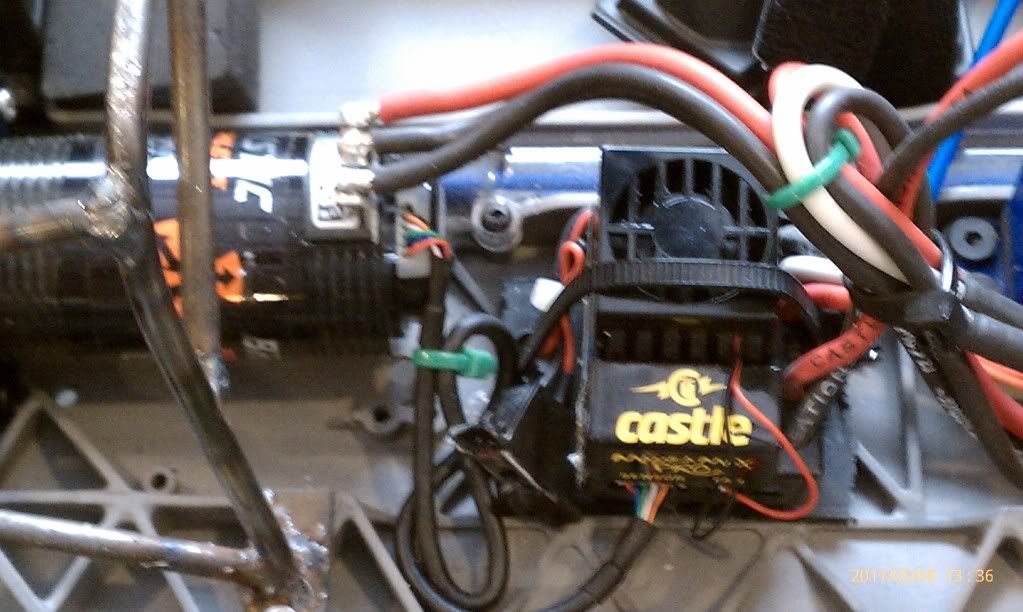 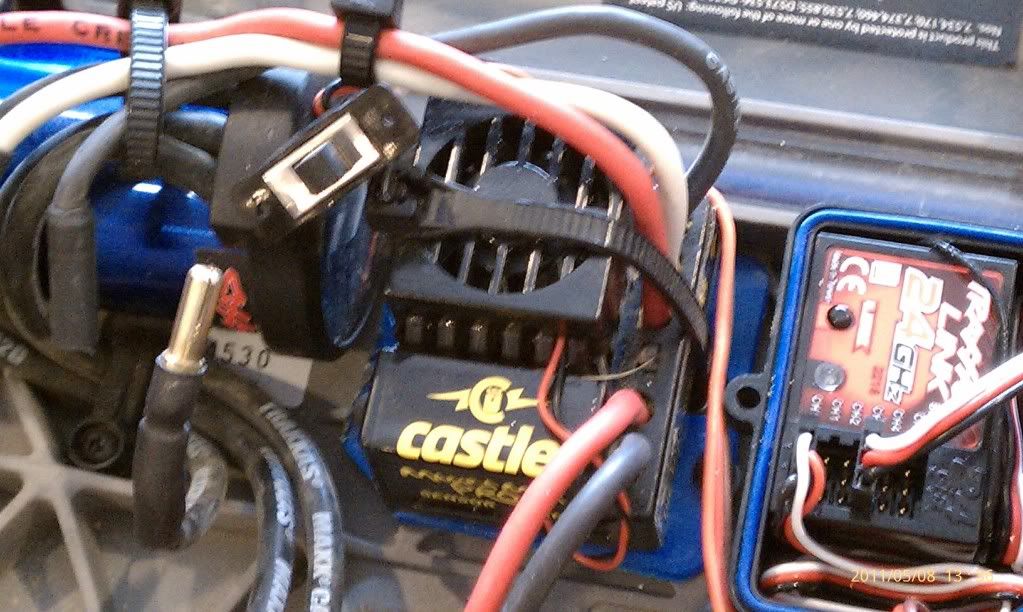 I hope I can get this taken care of soon. It is a P.I.T.B. 
|
|
|
|
|
|
|
|
|
|
|
|
|
(#5)
|
|
Old Skool

Offline
Posts: 7,494
Join Date: Feb 2007
Location: Devon, England
|
05.08.2011, 05:31 PM
The MMPro case was redesigned recently to make the fan less suseptable to damage from small stones, and to allow better cable routing ( rx wires exit the case higher up than before ).
No older versions of the esc that were problematic that I know of, MMPro is very reliable generally, compared to older MMMs at any rate. As for upgrading firmware- dont bother unless you are having problems with the version you started with, or there is some awesome new feature you really cant live without; as many PC geeks will tell you, newer firmware/software versions aren't always better... |
|
|
|
|
|
|
|
|
|
|
|
|
(#6)
|
|
Guest
Posts: n/a
|
05.08.2011, 05:53 PM
I've went through and uninstalled one of the esc's from the vehicle and put it by the computer and went one firmware version at a time and used all the previous versions from 1.21 to 1.32 with no luck. I hadn't upgraded and there had been some changes through when I bought them last year up until this year so that was a bit of upgrades with some added features.
The mmm combo took the upgrade good and the new one came with 1.32 so it worked right away. I even had loaded a saved settings file to the new one to be sure it wasn't something on my end. I'll refer the tech to this thread tomorrow and let him read it. I've tried everything possible short of the HAMMER on the case. I know one was bought locally on June 4 of last year and the other within a month from RC boys on ebay so I'd think Castle would say pack it up and send it in. I do need to figure out how to lookup my old transactions from this time last year on ebay so I can get the receipt. It was brand NIB when I bought it sealed up. I've spoke with Castle in the past and they're good people. I had just spoke with them a week ago because it had froze my laptop up after flashing 1.32 to the esc so they're aware of that. I hadn't ran the truck yet to lack of motivation and being busy. One of the trucks ran great at the ball diamonds 2 weeks ago. I have them just about ready to go in a box. Just need the word from Castle in the AM................... |
|
|
|
|
|
|
|
|
|
|
|
|
(#7)
|
|
Old Skool
Offline
Posts: 7,494
Join Date: Feb 2007
Location: Devon, England
|
05.08.2011, 08:30 PM
Hmm, if you paid with paypal then you should be able to find a receipt via their website under payments sent, though there is a time limit cutoff, so you can only look back so far I believe.
|
|
|
|
|
|
|
|
|
|
|
|
|
(#8)
|
|
|
Guest
Posts: n/a
|
 05.09.2011, 12:02 AM
Quote:
I got the paypal receipt. Thanks for the paypal tip on getting the receipts. There's a trick to getting them in the history section. You have to do a search for the older dates. I searched from this time last year and it was there so I printed it. Thanks Again !!!\ This whole thing is odd. This shouldn't happen. I've never had anything brick on me from doing a simple firmware update. I should've tried to use it sooner. I tend to wonder if there's something simple I've overlooked but I did the same thing (new firmware) to the newer esc so apparently I'm doing something right. I thought about trying my win xp pro system since the vista and win 7 starter edition don't work. I think it's a esc memory issue. I wonder if the buffer never dumped the old data to allow the new data to be written.Any castle techs out there that care to chime in or do they not chime in except for weekdays ??
|
|
|
|
|
|
|
|
|
|
|
|
|
|
(#9)
|
|
Guest
Posts: n/a
|
05.09.2011, 09:42 AM
Am I just seeing things or in your last pic you have one plug in the ch1 port on your receiver (I am guessing that is your steering servo) and the other plug in the ch3 port. What is that? Hope it's not your ESC plugged in there.
|
|
|
|
|
|
|
|
|
|
|
|
|
(#10)
|
|
RC-Monster Admin

Offline
Posts: 14,609
Join Date: Nov 2005
Location: Des Moines, IA
|
05.09.2011, 10:52 AM
The plug in CH3 isn't the same color as the ESC wires, so it's not that unless he used an extension...
|
  |
|
|
|
|
|
|
|
|
|
|
(#11)
|
|
RC-Monster Carbon Fiber
Offline
Posts: 279
Join Date: Oct 2007
|
05.09.2011, 12:04 PM
I’ve actually had the same issue a few times now. Twice with a Mamba 25 and once with a MMM. Right now the Mamba 25 is acting up. Before I would just update it to the very first firmware version and then update it to the most current and it would work. Unfortunately this time it’s not working for my Mamba 25….
|
|
|
|
|
|
|
|
|
|
|
|
|
(#12)
|
|
Guest
Posts: n/a
|
05.09.2011, 01:41 PM
The extra wire lead is an extension to hook up a transponder on that channel for the couple times my son and I tried our hand at racing last year. Unfortunately some medical issues put the brakes on racing financially and physically last year. Hopefully within a year I can get back on the scene. I just recently started using my cars a little here and there. I'll call castle in a bit as I woke up a bit ago.
|
|
|
|
|
|
|
|
|
|
|
|
|
(#13)
|
|
Guest
Posts: n/a
|
 05.09.2011, 07:30 PM
I called Castle support today and he had me go under the basic tab in the castle link desktop software and had me look at the bottom left where it says transmitter calibration. The values were all at 00 so he said they're working on a release of this week to update the firmware and asked me to wait until then.
I guess I'll be waiting till then. He said it was a known bug and they have the users check what I posted first. He and I did both discuss the fact that this is a small percentage because my mmp sct esc that is sitting here came out of the box with firmware ver 1.32 and II even upgraded it to check since it's new and under warranty and it has the settings which is a series of these numbers. This is the fix so I have to wait I guess. 
|
|
|
|
|
|
|
 |
«
Previous Thread
|
Next Thread
»
| Currently Active Users Viewing This Thread: 1 (0 members and 1 guests) | |
 Linear Mode

|
|

Powered by vBulletin® Version 3.8.11
Copyright ©2000 - 2026, vBulletin Solutions Inc.
vBulletin Skin developed by: vBStyles.com
Copyright ©2000 - 2026, vBulletin Solutions Inc.
vBulletin Skin developed by: vBStyles.com
