
 |
|
|
|
|
|
 |


 |
Offical Paint & airbrush ?'s thread |
 |

|
 |

|
(#1)
|
|
RC-Monster Brushless

Offline
Posts: 2,824
Join Date: Apr 2005
Location: largo fl
|
Offical Paint & airbrush ?'s thread -
09.09.2009, 07:30 PM
I thought it would be nice to have one place to get all your painting & airbrush ?'s answerd . So here it is . So to help all us beginning painters out . Please ask your paint & airbrush ?'s here .
I just bought my first airbrush http://cgi.ebay.com/Gravity-Feed-MIC...d=p3911.c0.m14 . I bought this gun based on the reccomendation by team3six . He said it is a very good gun for beginner's . He also stated this gun will still be good once your skills develope . |
|
|

|
 |
 |
 |
|
|
|
|
|
|
(#2)
|
|
RC-Monster Brushless
Offline
Posts: 2,824
Join Date: Apr 2005
Location: largo fl
|
09.17.2009, 02:53 PM
I got my airbrush in the mail today & it looks great . But i have a ? . there is a nob on the end of the gun ( needle adj screw). How sholud this be adjusted . To me it looks like it is a adjustable stop to limit the needle throw . Is this correct & how do i know when it's adjusted properly . ?.
|
|
|
|
|
|
|
|
|
|
|
|
|
(#3)
|
|
That's All Folks!

Offline
Posts: 2,359
Join Date: Dec 2006
Location: in a VAN down by the RIVER
|
09.17.2009, 03:14 PM
That should be adjusted to give the amount of paint you need (how far the needle opens).
I'm waiting on a new airbrush any day now. |
|
|
|
|
|
|
|
|
|
|
|
|
(#4)
|
|
|
RC-Monster Brushless
Offline
Posts: 2,824
Join Date: Apr 2005
Location: largo fl
|
09.17.2009, 03:21 PM
Quote:
http://cgi.ebay.com/Gravity-Feed-MIC...d=p3911.c0.m14 |
|
|
|
|

|
|
|
|
|
|
|
|
|
(#5)
|
|
RC-Monster Brushless
Offline
Posts: 2,824
Join Date: Apr 2005
Location: largo fl
|
09.18.2009, 04:18 PM
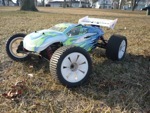
Well i did my first airbrush paint job. I think it looks pretty good for the first one . I dont know how to post pics . So if someone could host or post it for me please let me know . I used fascolor water based paint . also to anyone that uses fascolor paint . what do you use to thin the paint, & how much do you thin it ?. I used the fascolor thinner . but i've heard people use windex or alchol as well .
|
|
|
|
|
|
|
|
|
|
|
|
|
(#7)
|
|
|
RC-Monster Brushless
Offline
Posts: 2,824
Join Date: Apr 2005
Location: largo fl
|
09.18.2009, 09:09 PM
Quote:
|
|
|
|
|
|
|
|
|
|
|
|
|
|
(#8)
|
|
Guest
Posts: n/a
|
09.18.2009, 09:37 PM
Have you tried hosting on photo bucket or a similar site before?
As for Faskolor paints, I have heard of using water and Windex. I haven't used it much before but I know it's pretty thick and I think I read somewhere too spray near 60psi without thinning. I don't think it would take much water too thin, maybe like a teaspoon per bottle or so. I have been looking for more info since that's the paint I have all the fluorescent colors in. I love painting but I am not that good. I would like too become good enough too paint for people to fund my projects. Oh yeah the knob on the rear limits how much paint you spray, good for outlining and such. |
|
|
|
|
|
|
|
|
|
|
|
|
(#9)
|
|
|
RC-Monster Brushless
Offline
Posts: 2,824
Join Date: Apr 2005
Location: largo fl
|
09.18.2009, 09:45 PM
Quote:
He also said aroud 40 -50 pounds is the air pressure needed with normal thinning . Also i dont know how to use photo bucket . |
|
|
|
|
|
|
|
|
How to attach Pics to your post |
|
|
|
|
|
(#10)
|
|
That's All Folks!
Offline
Posts: 2,359
Join Date: Dec 2006
Location: in a VAN down by the RIVER
|
How to attach Pics to your post -
09.19.2009, 12:44 AM
Click "reply"
Scroll down and click "manage attachments" button A small window should pop up (as long as you allow pop ups for RCM) Click "browse" button find file on your computer Click "upload" button When it is done, scroll down and click "close window" Your pic should show in the "attach files" section Click "submit reply" |
|
|
|
|
|
|
|
|
|
|
|
|
(#11)
|
|
RC-Monster Titanium

Offline
Posts: 1,803
Join Date: Aug 2005
Location: arkansas
|
09.19.2009, 01:49 AM
i would really like to get another airbrush and learn to paint my bodies better. i have a smaller craftsman air compressor (1hp 3 gallon) what would i need to get to run a small airbursh such as the one you linked off of it? i know id need a Good secondary regulator, and a air water filter but is there anthing else?
how much do you spend on paint per body compared to cans? |
|
|
|
|
|
|
|
|
|
|
|
|
(#12)
|
|
RC-Monster Brushless
Offline
Posts: 2,824
Join Date: Apr 2005
Location: largo fl
|
09.19.2009, 11:29 AM
Here are the pics . Thank's for the help bdebde . Rooter you should need a hose & that should be it . My paint cost me $4.29 a bottle .
|
|
|
|
|
|
|
|
|
|
|
|
|
(#13)
|
|
RC-Monster Titanium
Offline
Posts: 1,803
Join Date: Aug 2005
Location: arkansas
|
09.19.2009, 08:49 PM
yea but do you use an entire bottle on a body??? basically im wondering if the cost of paint is cheaper per body using the an airbrush over cans example say i spend 10-12 dollars in paint to rattle can a body so are you spending $2-4 $4-6 ???? how many oz of paint in an airbrush does it take?
im trying to somehow convince myself this will benefit me... lol |
|
|
|
|
|
|
|
|
|
|
|
|
(#14)
|
|
RC-Monster Brushless
Offline
Posts: 2,436
Join Date: Nov 2005
Location: Edmonds WA
|
09.19.2009, 09:22 PM
How long do your lids last? Mine are normally in the garbage after about 4-6 months, so its not economical for me to use my airbrush on them (factor in the time it takes for airbrushing).
I did one nice Powerwagon body a couple years ago, and it just sits on my shelf. Other than that, I just rattle can them now. 
|
|
|
|
|
|
|
|
|
|
|
|
|
(#15)
|
|
RC-Monster Brushless
Offline
Posts: 2,824
Join Date: Apr 2005
Location: largo fl
|
09.20.2009, 12:07 AM
Ross no not the entire bottle . Depending on the amount of a certin color . I mixed 3 table spoons of paint to 1 to 1 1/2 table spoons of thinner . I have a lot of paint left . The cup on my gun holds 7cc of paint . I filled my cup about 2 times for the green & yellow . I filled the cup maybe 3 times for the white , because the white coverd the whole body plus wing .
JT my lids last a while because i hardly use them  . I got the airbrush because i was tired of all the clean up between colors using rattle cans . . I got the airbrush because i was tired of all the clean up between colors using rattle cans .
|
|
|
|
|
|
|
 |
«
Previous Thread
|
Next Thread
»
| Currently Active Users Viewing This Thread: 1 (0 members and 1 guests) | |
 Linear Mode

|
|

Powered by vBulletin® Version 3.8.11
Copyright ©2000 - 2026, vBulletin Solutions Inc.
vBulletin Skin developed by: vBStyles.com
Copyright ©2000 - 2026, vBulletin Solutions Inc.
vBulletin Skin developed by: vBStyles.com
